Thursday, 25 October 2018

Program to solve 4 variable equation(octave code)

function [x,y,z,alpha]=eq4variable(aaaa1,bbbb1,dddd1,eeee1,cccc1,aaaa2,bbbb2,dddd2,eeee2,cccc2,aaaa3,bbbb3,dddd3,eeee3,cccc3,aaaa4,bbbb4,dddd4,eeee4,cccc4)
    var1=[aaaa1,bbbb1,dddd1,cccc1]
    var2=[aaaa2,bbbb2,dddd2,cccc2]
    var3=[aaaa3,bbbb3,dddd3,cccc3]
    var3=[aaaa4,bbbb4,dddd4,cccc4]

   
      %solving equation
  
  %reassigning values to convert equation into 3 variable 
  aaa1=aaaa1*eeee2;
  bbb1=bbbb1*eeee2;
  ccc1=cccc1*eeee2;
  ddd1=dddd1*eeee2;
  eee1=eeee1*eeee2;
 
  aaa2=aaaa2*eeee1;
  bbb2=bbbb2*eeee1;
  ccc2=cccc2*eeee1;
  ddd2=dddd2*eeee1;
  eee2=eeee2*eeee1;
   %Subtracting equation1 and equation2
  PPP1=aaa1-aaa2;
  RRR1=bbb1-bbb2;
  SSS1=ddd1-ddd2;
  TTT1=eee1-eee2;
  QQQ1=ccc1-ccc2;
 
    %reassigning values to convert equation into 3 variable 
  aaa3=aaaa3*eeee4;
  bbb3=bbbb3*eeee4;
  ccc3=cccc3*eeee4;
  ddd3=dddd3*eeee4;
  eee3=eeee3*eeee4;
 
  aaa4=aaaa4*eeee3;
  bbb4=bbbb4*eeee3;
  ccc4=cccc4*eeee3;
  ddd4=dddd4*eeee3;
  eee4=eeee4*eeee3;
   %Subtracting equation3 and equation4
  PPP2=aaa3-aaa4;
  RRR2=bbb3-bbb4;
  SSS2=ddd3-ddd4;
  TTT2=eee3-eee4;
  QQQ2=ccc3-ccc4;
 
    %reassigning values to convert equation into 3 variable 
  aaa5=aaaa1*eeee4;
  bbb5=bbbb1*eeee4;
  ccc5=cccc1*eeee4;
  ddd5=dddd1*eeee4;
  eee5=eeee1*eeee4;
 
  aaat6=aaaa4*eeee1;
  bbb6=bbbb4*eeee1;
  ccc6=cccc4*eeee1;
  ddd6=dddd4*eeee1;
  eee6=eeee4*eeee1;
   %Subtracting equation1 and equation4
  PPP3=aaa1-aaa4;
  RRR3=bbb1-bbb4;
  SSS3=ddd1-ddd4;
  TTT3=eee1-eee4;
  QQQ3=ccc1-ccc4;
 
  [x,y,z]=eq3variable(PPP1,RRR1,SSS1,QQQ1,PPP2,RRR2,SSS2,QQQ2,PPP3,RRR3,SSS3,QQQ3)
 
  alpha=(cccc1-(aaaa1*x)-(bbbb1*y)-(ccc1*z))/eeee1
 
  end

For proper reading I had done some color changes:


Comments are written in green.
function and conditions are written in aqua blue.
Input arguments are highlighted by yellow color.

This code is not tested yet.....


Monday, 22 October 2018

Program to solve 3 variable equation (Octave code)


I am extremely sorry about my previous code it was not giving correct result. But this code is working correctly.


function eq3variable(aaa1,bbb1,ddd1,ccc1,aaa2,bbb2,ddd2,ccc2,aaa3,bbb3,ddd3,ccc3)
    var1=[aaa1,bbb1,ddd1,ccc1]
    var2=[aaa2,bbb2,ddd2,ccc2]
    var3=[aaa3,bbb3,ddd3,ccc3]

 
      %solving equation

  %reassigning values to convert equation into two variable = eliminating d1 and d2
  aa1=aaa1*ddd2;
  bb1=bbb1*ddd2;
  cc1=ccc1*ddd2;
  dd1=ddd1*ddd2;

  aa2=aaa2*ddd1;
  bb2=bbb2*ddd1;
  cc2=ccc2*ddd1;
  dd2=ddd2*ddd1;

  %Subtracting equation1 and equation2
  PP1=aa1-aa2;
  RR1=bb1-bb2;
  SS1=dd1-dd2;
  QQ1=cc1-cc2;

  %----------------------------------------------------  
  aa3=aaa3*ddd2;
  bb3=bbb3*ddd2;
  cc3=ccc3*ddd2;
  dd3=ddd3*ddd2;

  aa2=aaa2*ddd3;
  bb2=bbb2*ddd3;
  cc2=ccc2*ddd3;
  dd2=dd2*ddd3;

  %Subtracting equation3 and equation2
  PP2=aa3-aa2;
  RR2=bb3-bb2;
  SS2=dd3-dd2;
  QQ2=cc3-cc2;

  eq2variable(PP1,RR1,QQ1,PP2,RR2,QQ2)

function eq2variable(aa1,bb1,cc1,aa2,bb2,cc2)
  var1=[aa1,bb1,cc1]
  var2=[aa2,bb2,cc2]

  %solving equation
  %reassigning values to solve value of y
  ay1=aa1*aa2;
  by1=bb1*aa2;
  cy1=cc1*aa2;

  ay2=aa2*aa1;
  by2=bb2*aa1;
  cy2=cc2*aa1;

  %Subtracting equation1 and equation2
  P1=ay1-ay2;
  R1=by1-by2;
  Q1=cy1-cy2;

  y=Q1/R1;

  %reassigning values to solve value of x
  ax1=aa1*bb2;
  bx1=bb1*bb2;
  cx1=cc1*bb2;

  ax2=aa2*bb1;
  bx2=bb2*bb1;
  cx2=cc2*bb1;

  %Subtracting equation1 and equation2
  P2=ax1-ax2;
  R2=bx1-bx2;
  Q2=cx1-cx2;

  x=Q2/P2;

x=x
y=y


end

x=x;
y=y;

z=(-(aaa1*x)-(bbb1*y)+ccc1)/ddd1

end


For proper reading I had done some color changes:


Comments are written in green.
function and conditions are written in aqua blue.
Input arguments are highlighted by yellow color.

This code will not work if any of the input arguments is zero


Sunday, 21 October 2018

Solve 2 variable equation (Octave code)


I am extremely sorry about my previous code it was not giving correct result. But this code is working correctly.

function eq2variable(aa1,bb1,cc1,aa2,bb2,cc2)
  var1=[aa1,bb1,cc1]
  var2=[aa2,bb2,cc2]

  %solving equation
  %reassigning values to solve value of y
  ay1=aa1*aa2;
  by1=bb1*aa2;
  cy1=cc1*aa2;

  ay2=aa2*aa1;
  by2=bb2*aa1;
  cy2=cc2*aa1;

  %Subtracting equation1 and equation2
  P1=ay1-ay2;
  R1=by1-by2;
  Q1=cy1-cy2;

  y=Q1/R1;

  %reassigning values to solve value of x
  ax1=aa1*bb2;
  bx1=bb1*bb2;
  cx1=cc1*bb2;

  ax2=aa2*bb1;
  bx2=bb2*bb1;
  cx2=cc2*bb1;

  %Subtracting equation1 and equation2
  P2=ax1-ax2;
  R2=bx1-bx2;
  Q2=cx1-cx2;

  x=Q2/P2;

x=x
y=y


end


For proper reading I had done some color changes:


Comments are written in green.
function and conditions are written in aqua blue.
Input arguments are highlighted by yellow color.

This code will not work if any of the input arguments is zero

Saturday, 20 October 2018

Perform NOR operation on two decimal numbers (Octave code)

function  NOr_conversion(dec1,dec2)
i=1;
j=1;
dec_count=1;

for dec_count=1:1:2
  if dec_count==1
    dividend=dec1;
    i=i;
  end
  if dec_count==2
    dividend=dec2;
    i=j;
  end
  if dividend==0
    binary_value=0
  else
q_temp=dividend;
    while (q_temp>1)
      r_temp=mod(q_temp,2);
      binary_matrix(i,1)=q_temp;
      binary_matrix(i,2)=r_temp;

      q_temp=floor(dividend/2);
      dividend=q_temp;
      i=i+1;
    end
   binary_matrix(i,2)=1;
   a=binary_matrix(:,2);
   b=a';
   binary_value=flip(b);
   end
 
  if dec_count==1
    A_binary_value=binary_value
  end
  if dec_count==2
    B_binary_value=binary_value
  end 
end

% zero padding
  A_count=size(A_binary_value);
  A_count=A_count(1,2);
  B_count=size(B_binary_value);
  B_count=B_count(1,2);
  count=max(A_count,B_count)
  for net_count=count: -1 : 1
    if A_count == 0
      A_binary_value(1,net_count)=0;
    else
      A_binary_value(1,net_count)=A_binary_value(1,A_count);
      A_count=A_count-1;
    end
    if B_count == 0
     B_binary_value(1,net_count)=0;
    else
     B_binary_value(1,net_count)=B_binary_value(1,B_count);
     B_count=B_count-1;
    end
 
  end
    A= A_binary_value(1,:)
    B= B_binary_value(1,:)
 
% Zero padding end

% Oring the two values
    for Or_count=count:-1:1
      if A(1,Or_count)==B(1,Or_count);
        Or_result(1,Or_count)=A(1,Or_count);
      else
        Or_result(1,Or_count)=1;
      end
 
% NOR conversion 
   
      if Or_result(1,Or_count)==1
        NOr_result(1,Or_count)=0;
      end
      if Or_result(1,Or_count)==0
        NOr_result(1,Or_count)=1;
      end
    end
    Or_result=Or_result(1,:)
    NOr_result=NOr_result(1,:)
 
end

Flaws of the above code:

1. It will only work correctly if smaller number is entered as dec1 and greater number as dec2.
2. This program contains many loops so speed of evaluation will be slow.

Perform NAND Operation on two decimal numbers (Octave code)

function  NAnd_conversion(dec1,dec2)
i=1;
j=1;
dec_count=1;

for dec_count=1:1:2
  if dec_count==1
    dividend=dec1;
    i=i;
  end
  if dec_count==2
    dividend=dec2;
    i=j;
  end
  if dividend==0
    binary_value=0
  else
q_temp=dividend;
    while (q_temp>1)
      r_temp=mod(q_temp,2);
      binary_matrix(i,1)=q_temp;
      binary_matrix(i,2)=r_temp;

      q_temp=floor(dividend/2);
      dividend=q_temp;
      i=i+1;
    end
   binary_matrix(i,2)=1;
   a=binary_matrix(:,2);
   b=a';
   binary_value=flip(b);
   end
 
  if dec_count==1
    A_binary_value=binary_value
  end
  if dec_count==2
    B_binary_value=binary_value
  end 
end

% bits padding
  A_count=size(A_binary_value);
  A_count=A_count(1,2);
  B_count=size(B_binary_value);
  B_count=B_count(1,2);
  count=max(A_count,B_count)
  for net_count=count: -1 : 1
    if  A_count == 0
      A_binary_value(1,net_count)=0;
    else
      A_binary_value(1,net_count)=A_binary_value(1,A_count);
      A_count=A_count-1;
    end
    if  B_count == 0
     B_binary_value(1,net_count)=0;
    else
     B_binary_value(1,net_count)=B_binary_value(1,B_count);
     B_count=B_count-1;
    end
 
  end
    A= A_binary_value(1,:)
    B= B_binary_value(1,:)
 
% Zero padding end

% Anding the two values
  for And_count=count:-1:1
    if A(1,And_count)==B(1,And_count);
      And_result(1,And_count)=A(1,And_count);
    else
      And_result(1,And_count)=0;
    end

% Nand conversion
    if And_result(1,And_count)==0
      NAnd_result(1,And_count)=1;
    end
    if And_result(1,And_count)==1
      NAnd_result(1,And_count)=0;
    end
   
  end
    And_result=And_result(1,:)
    NAnd_result=NAnd_result(1,:)
   
end

Flaws of the above code:

1. It will only work correctly if smaller number is entered as dec1 and greater number as dec2.
2. This program contains many loops so speed of evaluation will be slow.


Perform OR operation on two decimal numbers (Octave Code)

function  Or_conversion(dec1,dec2)
i=1;
j=1;
dec_count=1;

for dec_count=1:1:2
  if dec_count==1
    dividend=dec1;
    i=i;
  end
  if dec_count==2
    dividend=dec2;
    i=j;
  end
  if dividend==0
    binary_value=0
  else
q_temp=dividend;
    while (q_temp>1)
      r_temp=mod(q_temp,2);
      binary_matrix(i,1)=q_temp;
      binary_matrix(i,2)=r_temp;

      q_temp=floor(dividend/2);
      dividend=q_temp;
      i=i+1;
    end
   binary_matrix(i,2)=1;
   a=binary_matrix(:,2);
   b=a';
   binary_value=flip(b);
   end
 
  if dec_count==1
    A_binary_value=binary_value
  end
  if dec_count==2
    B_binary_value=binary_value
  end
end

% bits padding
  A_count=size(A_binary_value);
  A_count=A_count(1,2);
  B_count=size(B_binary_value);
  B_count=B_count(1,2);
  count=max(A_count,B_count)
  for net_count=count: -1 : 1
    if A_count == 0
      A_binary_value(1,net_count)=0;
    else
      A_binary_value(1,net_count)=A_binary_value(1,A_count);
      A_count=A_count-1;
    end
    if  B_count == 0
     B_binary_value(1,net_count)=0;
    else
     B_binary_value(1,net_count)=B_binary_value(1,B_count);
     B_count=B_count-1;
    end
 
  end
    A= A_binary_value(1,:)
    B= B_binary_value(1,:)
 
% Zero padding end

% Oring the two values
  for Or_count=count:-1:1
    if A(1,Or_count)==B(1,Or_count);
      Or_result(1,Or_count)=A(1,Or_count);
    else
      Or_result(1,Or_count)=1;
    end
  end
    Or_result=Or_result(1,:)
   
end

Flaws of the above code:

1. It will only work correctly if smaller number is entered as dec1 and greater number as dec2.
2. This program contains many loops so speed of evaluation will be slow.

Performing AND operation on two decimal numbers (Octave code)

function  And_conversion(dec1,dec2)
i=1;
j=1;
dec_count=1;

for dec_count=1:1:2
  if dec_count==1
    dividend=dec1;
    i=i;
  end
  if dec_count==2
    dividend=dec2;
    i=j;
  end
  if dividend==0
    binary_value=0
  else
q_temp=dividend;
    while (q_temp>1)
      r_temp=mod(q_temp,2);
      binary_matrix(i,1)=q_temp;
      binary_matrix(i,2)=r_temp;
   
      q_temp=floor(dividend/2);
      dividend=q_temp;
      i=i+1;
    end
   binary_matrix(i,2)=1;
   a=binary_matrix(:,2);
   b=a';
   binary_value=flip(b);
   end
 
  if dec_count==1
    A_binary_value=binary_value
  end
  if dec_count==2
    B_binary_value=binary_value
  end
end

% bits padding
  A_count=size(A_binary_value);
  A_count=A_count(1,2);
  B_count=size(B_binary_value);
  B_count=B_count(1,2);
  count=max(A_count,B_count)
  for net_count=count: -1 : 1
    if A_count == 0
      A_binary_value(1,net_count)=0;
    else
      A_binary_value(1,net_count)=A_binary_value(1,A_count);
      A_count=A_count-1;
    end
    if  B_count == 0
     B_binary_value(1,net_count)=0;
    else
     B_binary_value(1,net_count)=B_binary_value(1,B_count);
     B_count=B_count-1;
    end
 
  end
    A= A_binary_value(1,:)
    B= B_binary_value(1,:)
 
% Zero padding end

% Anding the two values
  for And_count=count:-1:1
    if A(1,And_count)==B(1,And_count);
      And_result(1,And_count)=A(1,And_count);
    else
      And_result(1,And_count)=0;
    end
  end
    And_result=And_result(1,:)
   
end

Flaws of the above code:

1. It will only work correctly if smaller number is entered as dec1 and greater number as dec2.
2. This program contains many loops so speed of evaluation will be slow.

Tuesday, 16 October 2018

Octave code for decimal to binary conversion

function result=decimal2binary(dividend)
i=1;
j=1;
 if dividend==0
    binary_value=0
  else
q_temp=dividend;
  while (q_temp>1)
  r_temp=mod(q_temp,2);
  binary_matrix(i,1)=q_temp;
  binary_matrix(i,2)=r_temp;
  display(binary_matrix);
  q_temp=floor(dividend/2);
  dividend=q_temp;
  i=i+1;
  end
  binary_matrix(i,2)=1;
  a=binary_matrix(:,2);
  b=a';
result=flip(b)
  end

end

This code is based on simple decimal to binary conversion .

Our number gets divide by 2. We get the result in two forms Quotient and Remainder. Remainder become the LSB and Quotient becomes dividend and again get divided by 2. Until Quotient become l. This condition is given in a while loop:

To store the values of Quotients and Remainders, I created a matrix binary_matrix with i rows and 2 columns. First column contains Quotient and Second column contains Remainder.

In this way we got all the bits. But I require column 2 only. So I extracted it. This will result into a matrix of (i*1) i rows and 1 column. I taken the transpose of it. Then arranged it in reverse order to get the result.  

Flaws of above program:
  1.  As this program contain loop it will be time consuming.
  2. This program will not convert float values to binary.


Wednesday, 30 May 2018

Lsb matching octave code for steganography

msg=[1,2,3,4];
msg_length=length(msg);
msg_product=msg_length*8;
msg_bitloc=1;
msg_count=1;

carrier_image=imread('D:/anshita/octave/images used/woman.jpg');
im_value=carrier_image;

if(msg_product<=255)

  for index=1:1:(msg_product)
  if (msg_count<=msg_length)
  display('loop starts')
    if ((im_value(1,index,1)==0)||(im_value(1,index,1)==255))
      index++;
      index_value=index
    else
      index_value=index
      #finding lsb of image
      a_image=im_value(1,index,1);
      b_imageString=dec2bin(a_image);
      c_image=str2double(b_imageString);
      binary_image=c_image;
      lsb_image=bitget(binary_image,1);
   
      #converting msg to binary
      if(msg_bitloc>8)
      msg_count = msg_count+1
      msg_bitloc=1
      else
      msg_bitloc=msg_bitloc
      msg_count=msg_count
      end
      a_msg=msg(1,msg_count)
      b_msgString=dec2bin(a_msg);
      c_msg=str2double(b_msgString);
      binary_msg=c_msg;
      msg_bit=bitget(binary_msg,msg_bitloc)
      msg_bitloc++;
   
      #matching message bit to lsb of image
      if (lsb_image==msg_bit)
        lsb_image=msg_bit;
          if (lsb_image == 0)
          new_binaryimage=bitset(binary_image,1,0)
          else
          new_binaryimage=bitset(binary_image,1,1)
          end
        #assigning values to image matrix
        new_decimalimage=bin2dec(num2str(new_binaryimage))
        im_value(1,index,1)=new_decimalimage;
      else
          # decreasing and increasing pixel value
          generate_value=round(rand(1))
       
          # increasing pixel value by 1
          if(generate_value==1)
            str_binaryImage=num2str(c_image);
            dec_image=bin2dec(str_binaryImage)
            increased_value=dec_image+1
            im_value(1,index,1)=increased_value;
            new_decimalimage=increased_value
          end
       
          # decreasing pixel value by 1
          if(generate_value==0)
            str_binaryImage=num2str(c_image);
            dec_image=bin2dec(str_binaryImage)
            decreased_value=dec_image-1
            im_value(1,index,1)=decreased_value;
            new_decimalimage=decreased_value
          end
          
      end 


    end
  end
  end
end
display('loop end')
image(im_value);

Lsb matching Steganography:

In lsb matching steganography RGB image or decimal form(0-255) of image is first converted to binary and last bit of it is matched with message bit. This matching is done until all message bits are matched. If the message bit = last bit of image then:
last bit of image pixel= message bit
otherwise ; a random number is generated either '0' or '1'.
if Random value '0' generates then pixel value is decreased by one
if Random value '1' generates then pixel value is increased by one


Saturday, 12 May 2018

LSB replacement STEGANOGRAPHY code

msg=[2,0,1,3];
msg_length=length(msg);
msg_product=msg_length*8;
loc_msg=1;
count_msgbit=1;

carrier_image=imread('G:/anshita software/octave/images used/woman.jpg');
im_value=carrier_image;
#im_value=15*ones(35);

if (msg_product<=255)
  for index=1:1:msg_product
 
    # binary conversion of image
    a_image=im_value(1,index,1);
    b_imageVector=dec2bin(a_image);
    c_image=str2double(b_imageVector);
    binary_image=c_image;
    lsb_image=bitget(c_image,1);
 
    # binary conversion of message
    if (count_msgbit>8)
      count_msgbit=1;
      loc_msg++;
    end
    a_msg=msg(1,loc_msg);
    b_msgVector=dec2bin(a_msg);
    c_msg=str2double(b_msgVector);
    msg_bit=bitget(c_msg,count_msgbit);
    c=count_msgbit++;
 
    #assigning msg values to image lsb
    lsb_image=msg_bit;
      if (lsb_image == 0)
        new_binaryimage=bitset(binary_image,1,0)
      else
        new_binaryimage=bitset(binary_image,1,1)
     
      end
   
   
     #assigning values to image matrix_type
     dec_imageValue=bin2dec(num2str(new_binaryimage));
     dummy=dec_imageValue
     index
     im_value(1,index,1)=dummy;


    end
end

image(im_value)

Steganography is the way to secretly embed message into image.
I have written an OCTAVE code to embed a message to image. This type of steganography is called LSB replacement steganography.
last bit of each pixel is replaced by message bit.
Images are in the form of RGB. But i am taking a 2 d matrix just as an example.


Saturday, 22 October 2016

Assembly language program to convert hexadecimal number to BCD (for 8051 microcontroller)


Assumptions:

1. A hexadecimal number is at location 40h and we need to convert it to BCD
2. Value stored at r0 is 40h
3. At the address 40h value is FFh
4. result stored in unpacked BCD form as ones digit at r3, tens value at r2 , hundred value at r1

Before we start with actual coding lets revise about BCD

BCD is a binary representation of numbers from 0 to 9
Since there could be max 4 bit change from 0 to 9 therefor BCD could be represented by 4 bits.
9d=9h=1001 BCD

Lets back to the program,
Max 8 bit number could be FFh = 255d , So on converting any 8 bit number to bcd we have our answer upto three places ones, tens, hundred.
Answer will stored in unpacked BCD form

first three instructions are only mov instructions
first r0 is assigned a value 40h which is the address where our value (hex value to be converted into BCD) is stored 
we will get this value from memory location 40h and assign it to accumulator by instruction:
mov a, @ro 

This type of addressing is called indrect addressing where a register  stores   address of any memory location and value from that address is assigned to destination.

the above picture is showing the procedure
As our leftmost digit could at hundred place max therefore we will divide our hexvalaue by 100(decimal) = 64 (hex) instruction 4
quotient will be the leftmost value.
remainder of it is again divided by 10d=Ah
quotient will be the middle value,
remainder is again divided by 1

So we got three values at hundredth place, tens , ones would be stored at r1, r2, r3


Friday, 14 October 2016

Simple mathematic operation and switching between register banks assembely language program 8051 microcontroller

8051 Assembly Language Program to add , subtract, multiply and divide two 8 bit numbers stored in register r0 and r1 of register bank 0 , store the results of various operations in different registers of register bank 1 (without loop) 

Assumption:
Values stored at register0 , register1 of register 0 are 23 h and 0A h respectively.
h=hexadecimal
Don't get panic with program it is very easy and small


Lets start
In our operation here PSW is used to select register bank only.

As it is assumed that r0 and r1 of register bank 0 have some values. So i had put it through immediate addressing.

To perform add operation one value should be stored in accumulator. And result of addition will be in accumulator(A)
As per requirement we want to store result in register bank 1
So first we have to select register bank1

why didn't we selected register bank 0 before?
Because on resetting the value of PSW register =00h means all bits are zero. Therefore automatically register bank zero get selected.


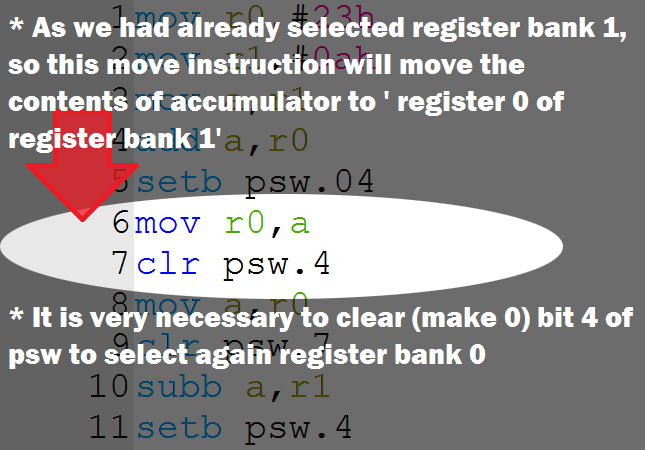
 As we had selected register bank 1 , now we could transfer the contents of accumulator(A) to register 0 of register bank 1. 
mov r0,a


To perform other arithmetic operation we need the value of register bank 0 therefore again we selected register bank 0. This is done by making 4th bit of PSW(PROGRAM STATUS WORD) again zero
Similary other mathematic operation will perform.


After first clr psw.4 rest of maths operation is performed as it is 

Subb a,r1 
Above instruction will minus contents of r1 from contents of accumulator

   Accumulator
-  value at register 1 of register bank 0
---------------------------------------------------
   result

Mul AB
 instruction for multiplication will multiply two 8 bit numbers stored in A(accumulator) and register 'B' and 16 bit result again get stored into A(lower byte of result) , B(higher byte of result)

Add  operation only


Sunday, 21 August 2016

Bytewise and bitwise operation difference

Before we start Bytewise and bitwise operation we should know what is bit and Byte
1 Byte consists of 8 bits
              8 bit = 1Byte
              4 bit = 1 nibble


Bytewise operation

8085 microprocessor or some other microcontroller or microprocessor performs only bytewise operation . By Bytewise operation i mean , all 8 bits of 1 byte would get change no matter we want to change single bit.

For example: In 8085 microprocessor we have to perform either Oring or Anding of byte to change a particular bit.
Suppose in accumulator the value is 22h or 00100010b and if we want to reset (0) 5th bit we have to perform either Oring or Anding whole Byte.

On writing instruction
ANI dfh

following operation will perform

at accumulator:            00100010 b   = 22h
intermediate walue:      11011111 b   = DFh
result:                         00000010 b   = 02h

** b means binary
** h means hexadecimal
**anding
    0 and 0=0
    0 and 1=0
    1 and 0=0
    1 and 1=0


U might have seen the school benches. When the boy at middle wants to go the other corner boy also have to move.

Similarly if we want to change single bit we have to mask all 8 bits of 1 Byte.


Bitwise Operation

bit means either 1 or 0. In this type of operation we can set (1) or reset (1) a single bit. Now to set a particular bit we should know the address of that bit.
In some microcontroller like 8051 there is facility of bit addressable area where we could set or reset a particular bit. We don't need to mask whole Byte.

For example in 8051 microcontroller to set(1) a particular bit there is an instruction
SETB  bit

to reset
CLR bit


U might have seen the table which could fold. So now if middle student wants to move he could without disturbing his benchmates.


In bitwise operation single bit could change.

Thank u 4 vising my blog


Wednesday, 22 June 2016

Procedure of circular convolution

Circular Convolution

if u like step by step learning. This post could help. Thank u for visiting my blog

solving circular convolution is just like solving graphical linear convolution.

three easy steps:
1. Fold
2. Shift 
3. Multiply 
And get the answers

Let the two sequences be x1(n)={1, 1, 2, 2}
x2(n)={1, 2, 3, 4}


for x(-n) enter the elements in counter clockwise direction. Multiply it to x2(n). Don't change x2(n). The result u will get after element by element multiplication and adding all the elements of result will be x3(0). You can check it by formula.


Then rotate the ring by 1 unit in clockwise direction. It will be x1(1-n). Multiply x1(1-n) by x2(n). Remember x2(n) will not change. The result after multiplication and adding all the elements of result is x3(2).

same will happen with x1(2-n) and x1(3-n)

Therefore the result is
x3(n)={15, 17, 15, 13}

Friday, 3 June 2016

Linear convolution

Graphical Linear convolution
i m writing in msg language. Its true muje convolution smjne me bhut problem ayi. And even didn't get it for 3 sem . 
lets start. Take two signals x(n) and h(n). We can vertically fold any of the two signals. Consider h(n).  But notice we have to fold by k not n 
therefore we take a dummy variable k. This i shown in the picture below. Now we can fold. Or take the mirror image of h(k). This also i had shown.
Now we multiply x(k) with h(-k) point to point multiplication.

now shift h(-k) by 1 rightwards. This would be h(1-k). Now again multiply h(1-k) by x(k). The result would be y(1). Similarly do with h(2-k) , h(3-k) and so on to give y(2), y(3).

so we obtain y(0), y(1),..………
and now y(n)={y(0), y(1),……………}

i m attaching a video becoz i didn't get folding and shifting easily.so that is my visualization

Program to solve 4 variable equation(octave code)

function [x,y,z,alpha]=eq4variable( aaaa1,bbbb1,dddd1,eeee1,cccc1,aaaa2,bbbb2,dddd2,eeee2,cccc2,aaaa3,bbbb3,dddd3,eeee3,cccc3,aaaa4,bbbb4,d...